> For the complete documentation index, see [llms.txt](https://docs.flowlity.com/llms.txt). Markdown versions of documentation pages are available by appending `.md` to page URLs; this page is available as [Markdown](https://docs.flowlity.com/settings/settings/suppliers.md).
# Suppliers
Manage your suppliers, their order constraints and lead time, and the periods when they are closed.
The **Suppliers** page lists the suppliers of your products. For each one, you can set the constraints Flowlity respects when it recommends orders (full truck, minimum order, order frequency, lead time) and the periods when the supplier is closed.
**Who changes it**: usually a supply chain manager or a buyer, when a supplier changes its conditions.
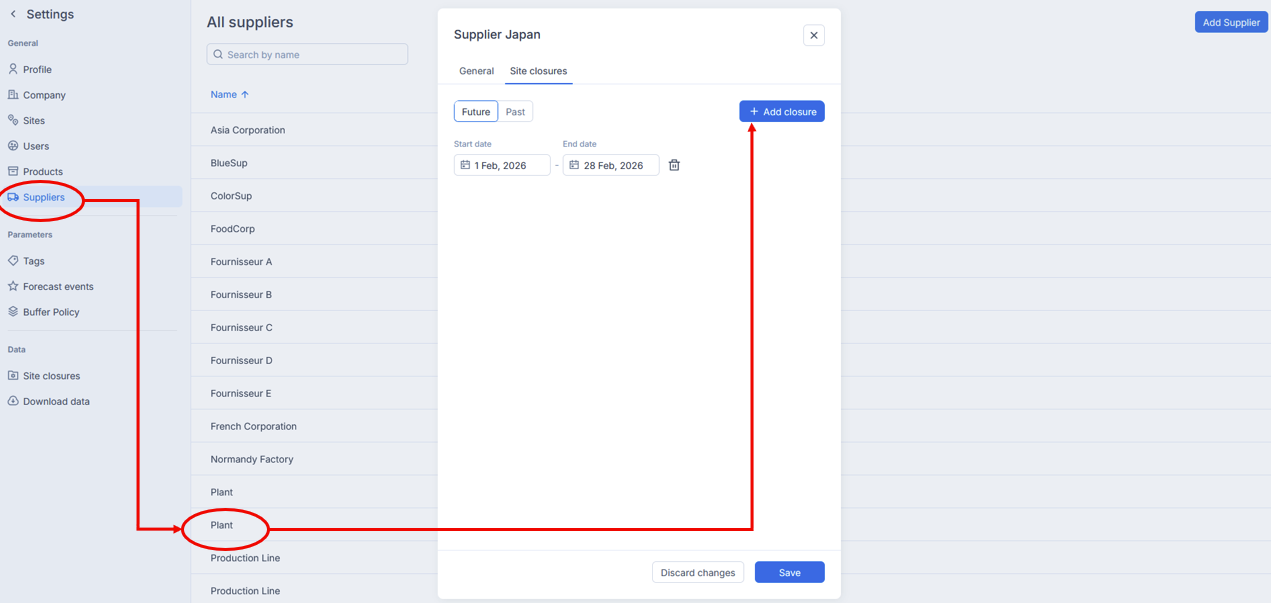
**Where to find it**: at the bottom of the sidebar, click **Settings**, then **General** > **Suppliers**. The page is called **All suppliers**. Use **Search by name** to find a supplier.
## How to update a supplier's constraints and lead time
{% stepper %}
{% step %}
### Open the supplier
Click the supplier in the list. Its panel opens on the **General** tab, with its **Ref**, **Name**, **Contact email (optional)**, **address (optional)** and **Max rows by order (export only)**.
{% endstep %}
{% step %}
### Fill in the constraints
Open **Constraints (optional)** and fill in what applies:
* **Full truck qte** and its unit: the quantity that fills a truck.
* **Min order qte** and its unit: the minimum the supplier accepts per order.
* **Order frequency**, in days: how often you can order from this supplier.
* **Lead time**, in days: the time between placing an order and receiving it.
{% endstep %}
{% step %}
### Save
Click **Save**. The lead time you enter here applies to every product of the supplier. If the products of the supplier have different lead times, the field shows **Mixed**.
{% endstep %}
{% endstepper %}
## How to declare a supplier closure
{% stepper %}
{% step %}
### Open the closures of the supplier
Click the supplier, then the **Site closures** tab. **Future** and **Past** list its closures.
{% endstep %}
{% step %}
### Add the closure
Click **Add closure**, then pick the **Start date** and the **End date**. Closures of the same supplier cannot overlap.
{% endstep %}
{% step %}
### Save
Click **Save**. Flowlity then plans the orders so that no delivery date falls inside the closure. The closure also shows in Planning, in the **Supplier closures** section of the **Product strategy** panel.
{% endstep %}
{% endstepper %}
## How to add a supplier
{% stepper %}
{% step %}
### Create the supplier
On the **All suppliers** page, click **Add Supplier**.
{% endstep %}
{% step %}
### Fill in and save
Enter at least the **Ref** and the **Name**, add the constraints if you know them, and click **Create**.
{% endstep %}
{% endstepper %}
## Good to know
* When your supplier data comes from your ERP or a data feed, those values stay the master data and override the changes you make here.
* Minimum order quantities and lot sizes per product are set in the **Suppliers** tab of each product. See [Products](/settings/settings/products.md).
* The closures of your own sites are set in [Site closures](/settings/settings/site-closures.md).
* The page is not available in the supplier view.
## Related pages
* [Supplier constraints and order management](/concepts/concepts/supplier-constraints.md)
* [Site closures](/settings/settings/site-closures.md)
* [Products](/settings/settings/products.md)