> For the complete documentation index, see [llms.txt](https://docs.flowlity.com/llms.txt). Markdown versions of documentation pages are available by appending `.md` to page URLs; this page is available as [Markdown](https://docs.flowlity.com/readme.md).
# Welcome
Flowlity user documentation: forecast demand, plan stock and supply, and validate orders with AI.
Flowlity is an AI planning platform for manufacturers, distributors and retailers. It brings demand forecasting, inventory optimization and supply planning together in one app.
This documentation is written for planners. It explains what each module does and how to do your daily tasks in it.
### New here?
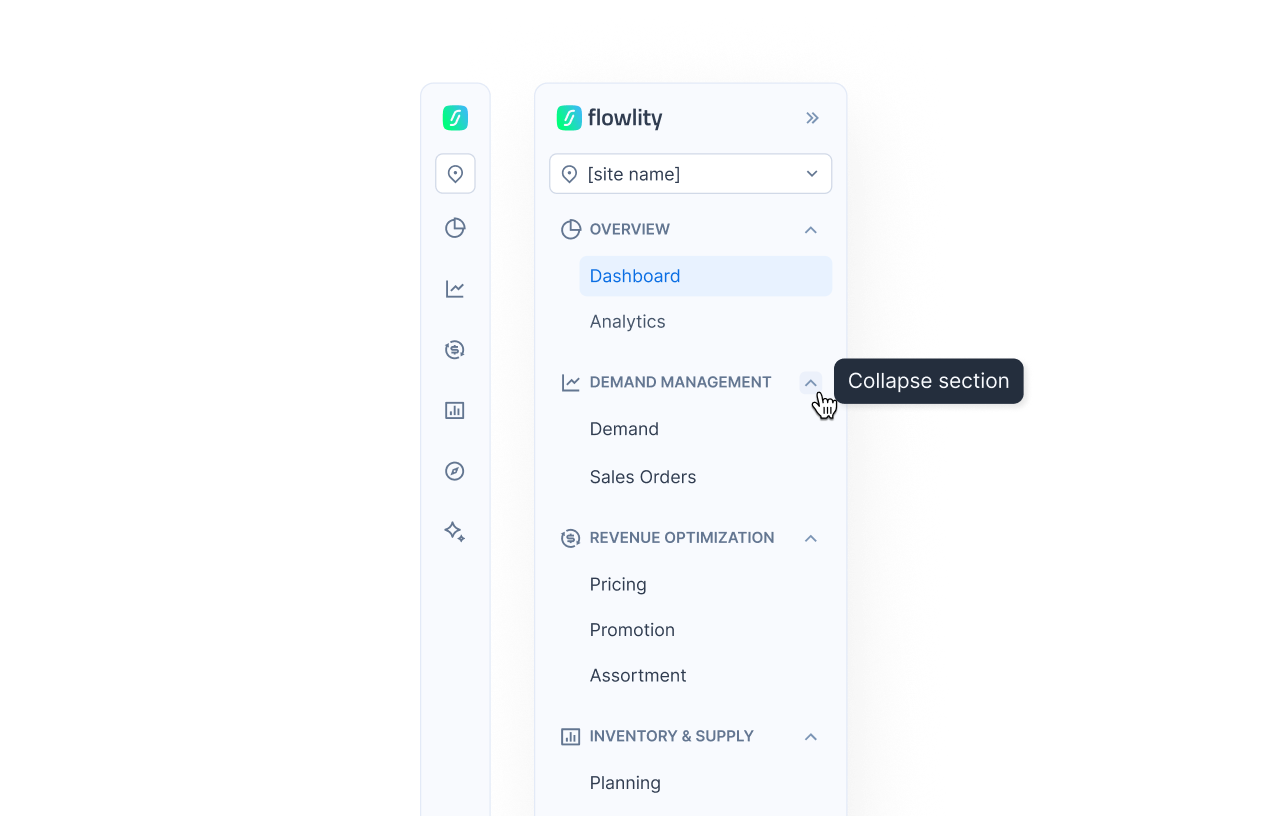
Every module of the sidebar in one line, section by section.
### Modules, as in the sidebar
You only see the modules activated on your site.
| Section | Module | What it is for |
| ------------------------ | ------------------------------------------------------- | -------------------------------------------------------------------- |
| **Overview** | [Dashboard](/overview/dashboard.md) | Your main KPIs and trends for the sites and products you follow |
| | [Analytics](/overview/analytics.md) | Reporting dashboards set up for your company |
| **Demand management** | [Demand](/demand-management/demand.md) | Review the AI forecast and adjust it with your own figures |
| | [Sales orders](/demand-management/sales-orders.md) | Follow the orders your customers place with you |
| **Revenue optimization** | [Pricing](/revenue-optimization/pricing.md) | Sales, profit and margin by product, with and without promotions |
| | [Promotions](/revenue-optimization/promotions.md) | Create and edit all your promotions and forecast events |
| | [Assortment](/revenue-optimization/assortment.md) | Choose which products are carried in which stores |
| **Inventory & supply** | [Planning](/inventory-and-supply/planning.md) | Projected stock, stock targets and recommended orders |
| | [Capacity](/inventory-and-supply/capacity.md) | Check that your plan fits your production capacity |
| | [Supply orders](/inventory-and-supply/supply-orders.md) | Review, validate and send your orders |
| **Strategy** | [Tactical](/strategy/tactical.md) | Compare projections with your objectives and run simulations (S\&OP) |
| **AI & automations** | [Automations](/ai-and-automations/automations.md) | Run routine changes on a schedule |
| | [Agents](/ai-and-automations/agents.md) | AI agents that clean data and suggest improvements |
| | [Co-planner](/ai-and-automations/co-planner.md) | Ask questions about your data in plain language |
### More ways to use Flowlity
| | |
| --------------------------------------------------------------------------------------- | -------------------------------------------------------------------------------- |
| [Flowlity Lite](/flowlity-lite.md) | AI planning without an integration project: upload your data as CSV or XLS files |
| [Supplier collaboration](/inventory-and-supply/supply-orders/supplier-collaboration.md) | Send orders to your suppliers for confirmation and follow their answers |
| [Connect your AI assistant (MCP)](/ai-and-automations/co-planner/mcp.md) | Use your Flowlity data from Claude, ChatGPT or Copilot |
### Key concepts
* [**Views and filtering**](/concepts/concepts/views-and-filtering.md): saved filters, columns, sorting and grouping, in every list.
* [**Inventory strategies**](/concepts/concepts/inventory-strategies.md): MTS Flowlity AI, My min, Reorder point, Reorder point + AI, MTO and No replenishment.
* [**Demand forecasting**](/concepts/concepts/demand-forecasting.md): how the forecast is built and how accurate it is.
* [**Safety stock settings**](/concepts/concepts/buffer-policies.md): safety stock, service levels and the Flowlity Min / Max corridor.
* [**Alerts**](/concepts/concepts/alerts.md): the stock, demand and order alerts that tell you where to act.
* [**KPIs**](/concepts/concepts/kpis.md): metric columns to sort and filter your product lists.
{% hint style="info" %}
The **Documentation** and **Changelog** links are in your profile menu, at the bottom of the sidebar. Need help? Contact your Customer Success Manager or write to .
{% endhint %}